
Queue multiple clips
Queue the video clips selected in your timeline. Process a few shots or select all the clips you want to stabilize in a sequence.
Premiere Pro stabilizer plugin
The Batch Video Stabilizer extension helps you stabilize multiple video clips automatically. It applies Warp Stabilizer to selected clips and analyzes them sequentially or in parallel.
New UXP extension for Premiere Pro 25.6 and newer · Windows & macOS
Using an older Premiere version? The legacy extension supports Premiere Pro 15.0 and higher.
Legacy version & trial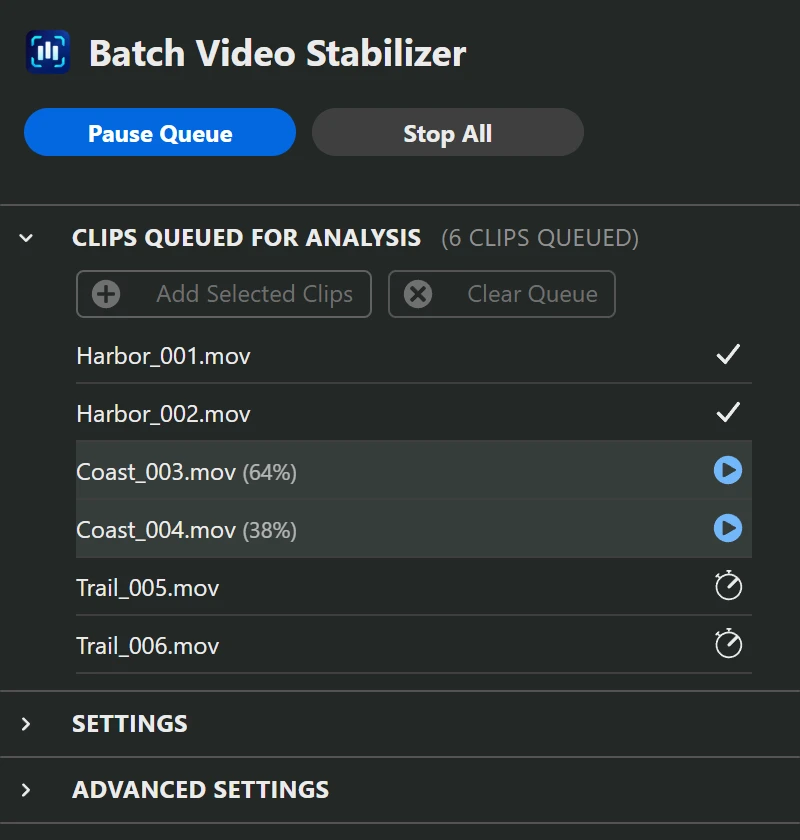
Supported functions
The extension uses Premiere’s Warp Stabilizer effect. It supports applying the effect to multiple clips, reanalyzing existing effects and using the same settings across a selection.
Add Warp Stabilizer to clips that do not have it.
Run analysis again on existing Warp Stabilizer effects.
Analyze several clips at the same time.
Apply selected effect values to multiple clips.
Batch stabilization in Premiere
The Batch Video Stabilizer extension lets you queue video clips for automatic Warp Stabilizer analysis. Select the clips in your timeline, choose the settings and start the queue.
You can analyze all selected clips one after another or enable parallel processing. If Warp Stabilizer is already applied, the extension can reanalyze the existing effects.
Product details on Vakago ToolsWhat the extension does
Manage analysis across a selection of clips, from newly added footage to a project that needs reanalysis.
Queue the video clips selected in your timeline. Process a few shots or select all the clips you want to stabilize in a sequence.
Run up to eight analyses concurrently. Choose a value that suits your footage and available memory.
Run fresh analysis on clips that already contain Warp Stabilizer, including projects that ask for reanalysis after a change.
Set selected Warp Stabilizer values across a batch. Choose whether to override effects already on your clips.
Collect clips with existing Warp Stabilizer inside nested sequences for reanalysis. Enable nested collection before adding the selection.
View the status of each clip, pause queue processing, retry eligible failures and optionally save the project when processing finishes.
Batch stabilization workflow
Open a sequence and select the video clips you want to stabilize. Click Add selected clips in the extension.
Set parallel processing, reanalysis and effect options. Test a few clips before processing a larger selection.
Click Start Queue. When processing finishes, review the stabilized clips in your timeline.
Video stabilizer plugin for Premiere Pro
Choose the version that matches your Premiere installation. Both extensions are available on Adobe Exchange.
Premiere Pro 25.6 and newer
The UXP extension supports batch analysis, parallel processing and custom Warp Stabilizer settings.
Premiere Pro 15.0 and higher
The legacy extension supports batch stabilization in older Premiere versions. A trial is available through its Adobe Exchange listing.
Check the relevant Adobe Exchange listing for installation instructions and compatibility. UXP and CEP controls can differ.
Instructions and troubleshooting
Missing frame analysis
Fix Frame not analyzed for stabilization and New frames need analyzing in Premiere Pro. Analyze one clip manually or queue multiple clips for Warp Stabilizer.
Read articleBatch stabilization workflow
Combine batch Warp Stabilizer analysis with horizon correction in Premiere Pro. Fix a tilted horizon after stabilizing clips and review rotation and crop.
Read articleWarp Stabilizer errors
Fix Warp Stabilizer requires re-analysis messages in Premiere Pro. Reanalyze multiple clips with existing effects after a project update or damaged analysis data.
Read articleQueue performance
Choose how many Warp Stabilizer clips to analyze in parallel. Compare queue time, memory use and Premiere responsiveness with a small, repeatable batch.
Read articleReviewing the picture
Review cropping and distortion after batch stabilization in Premiere. Adjust Smoothness, Method and Framing, then apply selected values to similar shots.
Read articleProduct information
Find the full settings reference and troubleshooting steps in the user guide.
For missing analysis messages, see Frame not analyzed for stabilization. For project-format or saved-data messages, see Warp Stabilizer requires re-analysis.
The extension queues multiple timeline clips and manages Premiere’s Warp Stabilizer analysis. It can add the effect, reanalyze existing stabilization and run several analyses in parallel. Premiere’s Warp Stabilizer produces the stabilized picture.
Use the new UXP extension for Premiere Pro 25.6 and newer. For an older Premiere version, use Batch Analysis for Warp Stabilizer, the legacy CEP extension for Premiere Pro 15.0 and higher. Both versions have a trial available on Adobe Exchange.
Select the video clips you want to stabilize in the active timeline, click Add selected clips in the extension and start the queue. The Batch Video Stabilizer extension can process them sequentially or in parallel.
Warp Stabilizer is included with Premiere Pro; it does not require a separate plugin download. Batch Video Stabilizer is an additional extension that automates analysis for multiple clips. Download the UXP version or the legacy Batch Analysis for Warp Stabilizer extension from Adobe Exchange.
Yes. The extension can apply Warp Stabilizer and analyze selected clips automatically. Choose sequential processing to analyze one clip after another, or enable parallel processing to analyze several clips at the same time. Review the stabilized clips when processing finishes.
It can improve total queue time by analyzing several clips at once. The result depends on the footage, available memory and processor. Start with one analysis, then increase the number gradually.
The UXP version can collect inner clips that already have Warp Stabilizer. Enable reanalysis and recursive nested collection before adding your selection. It does not automatically add Warp Stabilizer to every clip inside a nest.
No. Save project saves the Premiere project after the queue completes. Render previews or export the finished video using Premiere’s own controls. The legacy CEP version has separate completion options.
Premiere Pro stabilizer plugin
The extension supports automatic batch stabilization with Warp Stabilizer. Choose the download for your Premiere version.
UXP: Premiere Pro 25.6+ · Legacy CEP: Premiere Pro 15.0+ · Trials available
Download the full UXP version on Adobe Exchange
Vakago Tools

Correct tilted footage in Premiere Pro with local AI, manual rotation and automatic rotation keyframes.

Remove or blur video backgrounds in Premiere Pro using AI-generated masks.

Assign keyboard shortcuts to ExtendScript commands and JSX scripts in supported Adobe applications.